§Warranty
Berkeley Nucleonics shall not be responsible for defects caused by natural wear and tear, willful damage, negligence, force majeure, abnormal working conditions, or failure to follow Berkeley Nucleonics spoken or written guidelines as to the storage, installation, commissioning, use, or maintenance of the products or (if there are none) good trade practice; or where the customer alters or repairs such goods without written consent from Berkeley Nucleonics. Opening the instrument and/or breaking warranty seals voids the warranty. Service plans are subject to the same warranty policy regarding use.
Copyright
This manual is copyright by Berkeley Nucleonics and all rights are reserved. No portion of this document may be reproduced, copied, transmitted, transcribed, stored in a retrieval system, or translated in any form or by any means such as electronic, mechanical, magnetic, optical, chemical, manual, or otherwise, without written permission of Berkeley Nucleonics.
General Warranty
Berkeley Nucleonics warrants that the product will be free from defects in materials and workmanship for 1 year from the date of purchase of the product by the original purchaser from the Berkeley Nucleonics Company. The warranty period of accessories such as probe, battery, and adapter is 12 months. This warranty only applies to the original purchaser and is not transferable to a third party.
If the product proves defective during the warranty period, Berkeley Nucleonics either will repair the defective product without charge for parts and labor or will provide a replacement in exchange for the defective product. Parts, modules, and replacement products used by Berkeley Nucleonics for warranty work may be new or reconditioned to like-new performance. All replaced parts, modules, and products become the property of Berkeley Nucleonics.
To obtain service under this warranty, the Customer must notify Berkeley Nucleonics of the defect before the expiration of the warranty period. The Customer shall be responsible for packaging and shipping the defective product to the service center designated by Berkeley Nucleonics, along with a copy of customer proof of purchase.
This warranty shall not apply to any defect, failure, or damage caused by improper use or by improper or inadequate maintenance and care. Berkeley Nucleonics shall not be obligated to furnish service under this warranty:
- a) to repair damage resulting from attempts by personnel other than Berkeley Nucleonics representatives to install, repair, or service the product;
- b) to repair damage resulting from improper use or connection to incompatible equipment;
- c) to repair any damage or malfunction caused by the use of non-Berkeley Nucleonics supplies; or
- d) to service a product that has been modified or integrated with other products when the effect of such modification or integration increases the time or difficulty of servicing the product.
1General Remarks
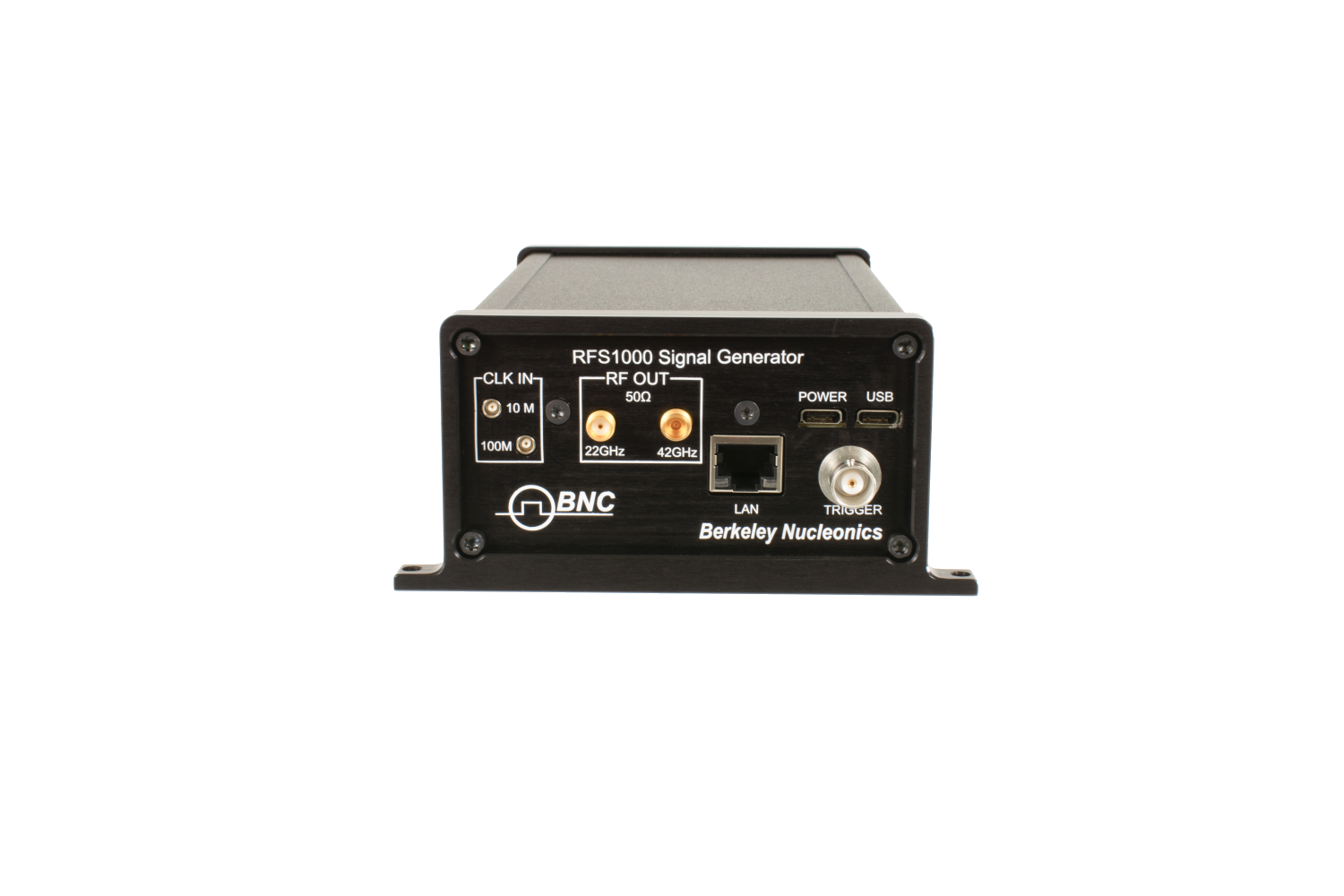
The RFS-1000 family comprises two CW and sweep RF/microwave generators, the RFS-1220 (0.1 to 22 GHz) and the RFS-1420 (0.1 to 42 GHz), each delivering up to +15 dBm output. They are engineered for automated test, impedance matching systems, antenna development, aerospace and defense research, wireless infrastructure build-out, and satellite-link validation. With straightforward controls, broad frequency coverage, and a rugged aluminum chassis, they deliver reliable performance in both lab and production environments.
| Model | Frequency Range | Maximum Output |
|---|---|---|
| RFS-1220 | 0.1 to 22 GHz | up to +15 dBm |
| RFS-1420 | 0.1 to 42 GHz | up to +15 dBm |
2Stand-Alone Use Quick Setup
Connect your device to a USB-C power source (5 V, 2.0 A minimum). Use a standard USB-C cable. A computer USB port or a high-current USB charger is recommended.
Communication Setup
- Connect to your computer using either USB-C or LAN (Ethernet).
- The device will appear as a COM port for software control.
Reference Input (Optional)
- Connect an external 10 MHz or 100 MHz reference to the REF IN port if preferred. Otherwise, the device will default to its internal OCXO source.
Trigger Setup
- Internal Trigger: select "Internal" in the SWEEP tab of the GUI to start sweeps on demand by software.
- External Trigger: apply a 5 V TTL pulse to the TRIG connector to initiate the saved sweep (or single-step, if configured) at the rising edge.
Software Interface
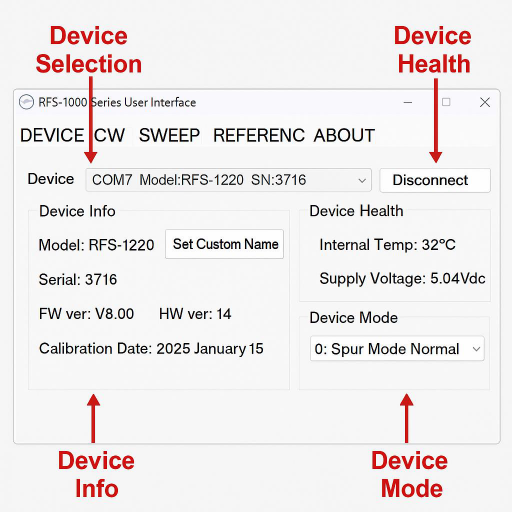
- Launch the BNC "RFS-1000 Series User Interface" (available on the BNC website).
- The software will automatically detect and show your connected model, firmware version, and internal temperature.
3Device Overview
Model Variants
| Model | Frequency Range |
|---|---|
| RFS-1220 | 0.1 to 22 GHz |
| RFS-1420 | 0.1 to 42 GHz |
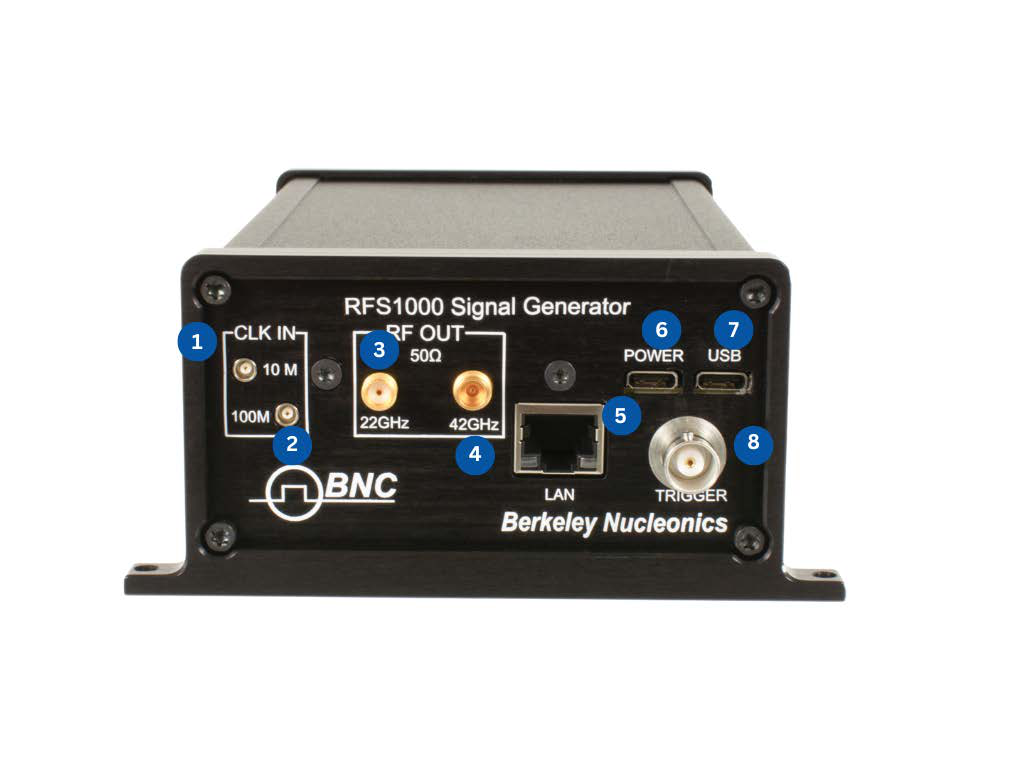
Front Panel Indicators
- CLK IN (10 MHz)
- CLK IN (100 MHz)
- RF OUT (SMA) – 20 GHz
- RF OUT (SMA) – 40 GHz
- LAN
- POWER
- USB
- TRIGGER (sweep control)
4CW Mode Operation
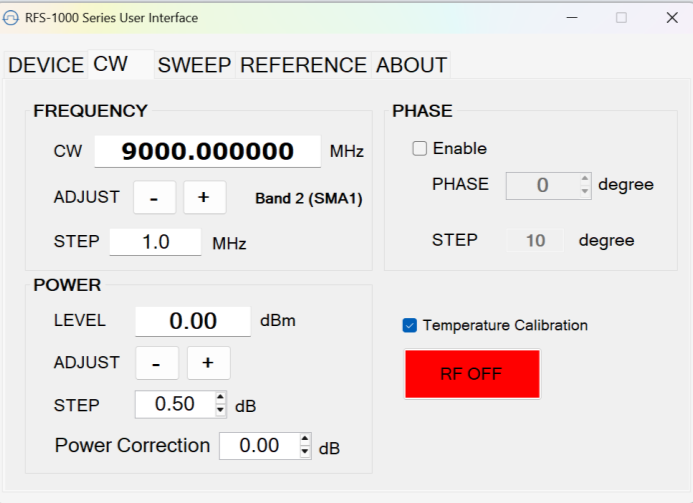
- Navigate to the CW tab in the GUI.
- Set Frequency (in MHz): e.g., 9000.000000
- Adjust Output Power: use the + / - buttons.
- Step size: 0.5 dB
- Enable RF Output: click the red "RF OFF" button to toggle RF ON.
Optional
- Enable and adjust Phase Offset in degrees (0 to 360°).
- Use the "Temperature Calibration" option as needed.
5Sweep Mode Operation
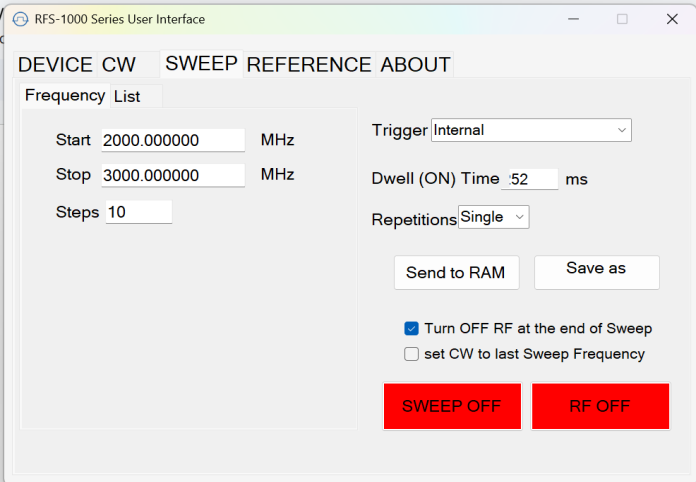
- Navigate to the SWEEP tab.
- Set Start / Stop Frequencies: e.g., 2000 MHz to 3000 MHz.
- Define Steps (e.g., 10 steps).
- Set Dwell Time (e.g., 52 ms per step).
- Trigger: Internal or external.
- Repetitions: choose Single or Continuous.
Execution
- Click "Send to RAM", then "SWEEP ON".
- Click "RF ON" to enable RF output.
- Optionally enable "Turn OFF RF at end of sweep" and "Set CW to last sweep frequency".
6Reference Input Options
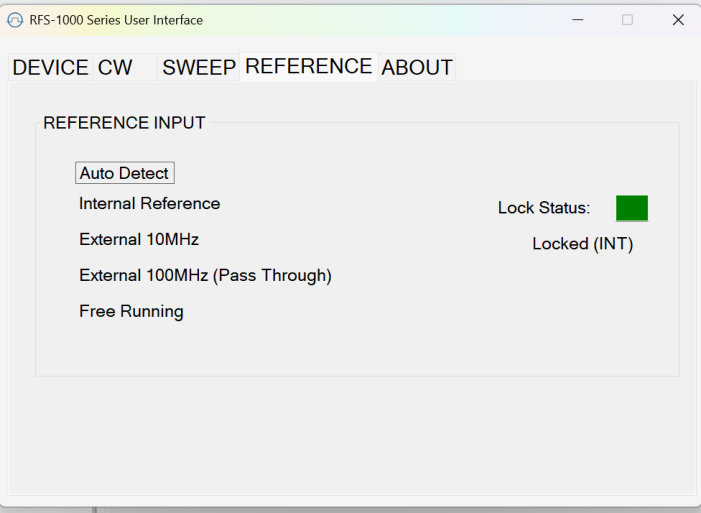
- Go to the REFERENCE tab.
Modes:
- Auto Detect
- Internal Reference (OCXO ±10 ppb)
- External 10 MHz
- External 100 MHz (Pass Through)
- Free Running
Lock Status: should show "Locked (INT)" or "Locked (EXT)" for stable operation.
7About Tab
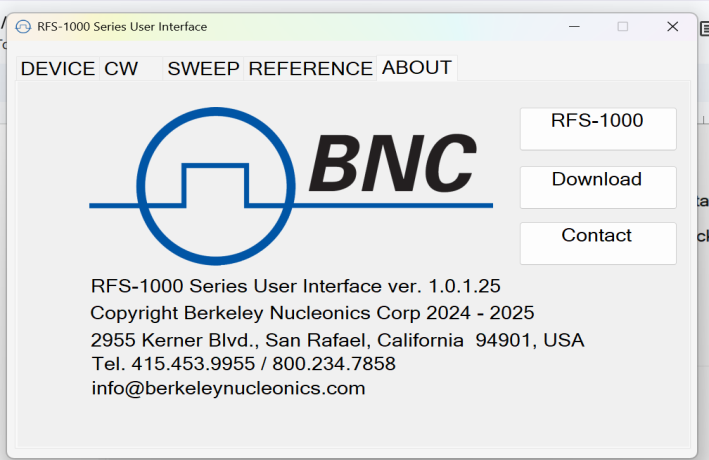
- BNC Logo & Branding: a large Berkeley Nucleonics Corp. logo centered at the top.
- Version & Copyright: shows the GUI version (e.g., 1.0.1.25) and a copyright line ("Berkeley Nucleonics Corp 2024 – 2025").
Action Buttons
- RFS-1000: opens the product overview or datasheet.
- Download: launches your browser to grab the latest control software.
- Contact: opens your default mail client addressed to BNC support.
8SCPI COM Command List
| Command | Parameters | Comment |
|---|---|---|
*UNITNAME | <string> | Set a unique name in flash memory |
*RST | Reset unit now | |
*DISPLAY | OFF | Power ON or OFF the display |
*BUZZER | OFF | Mute the buzzer |
*SAVESTATE | Save frequency & attenuation as boot defaults | |
SWE:MODE | LIST | Select the mode for sweeping (LIST, SCAN) |
FREQ:CW | 1 MHz to 42 GHz | Set output frequency in Hz |
OUTP:STAT | 1, 0 | Turn on or off the RF output |
POWER | -40 dBm to +10 dBm | Set output RF level in dBm |
VERNIER | 0.6 | Set the output power level vernier (fine-tune variable attenuator) |
SWE:DWELL | 100 | Sweep dwell time in milliseconds |
LIST:DIR | DOWN | Sweep direction |
INIT:IMM | Start the sweep now | |
INIT:CONT | Sweep continuous mode or single | |
ABORT | Stop the sweep now | |
FREQ:START | < > | Sweep start frequency in Hz |
FREQ:STOP | < > | Sweep stop frequency |
SWE:POINTS | <integer> | Sweep point count |
LIST:ADD | 11 GHZ | Add a point to the end of the sweeping list |
LIST:CLEAR | Clear the working frequency list and start over | |
SWE:MODE | OFF | Exits sweeping mode |
SWE:MODE | SCAN | Enter scan mode: sweeps between a start point and a stop point |
SWE:MODE | LIST | Enter list mode: sweeps an arbitrary list of user frequency points |
INIT:IMM | Trigger the sweep now | |
ABORT | Stop the sweep now | |
SWE:POINTS | Sets sweep point count | |
SWE:DWELL | Sweep dwell time in milliseconds | |
SWE:RESET | Return to the start of the point list (does not clear memory) | |
FREQ:START | Save the sweep start frequency | |
FREQ:STOP | Save the sweep stop frequency | |
INIT:CONT | Sweep continuously or only a single pass | |
LIST:DIR | Sweep direction | |
LIST:CLEAR | ||
LIST:ADD | Add a single point to the end of the sweeping list | |
INIT:STEPMODE | 0 | Normal mode where a trigger activates the entire sweep (default) |
INIT:STEPMODE | 1 | Only move forward one point in the sweep per trigger activation |
INIT:STEPMODE | 2 | Functions like STEPMODE 1 except that the dwell time is infinite |
SWE:ENDRFO | After the sweep completes, should RFO state be on or off |
§Contact Us
| Berkeley Nucleonics Corporation | 2955 Kerner Blvd., San Rafael, CA 94901 |
| Phone | (415) 453-9955 |
| info@berkeleynucleonics.com | |
| Web | www.berkeleynucleonics.com |
RFS-1000 User Manual · Document version 1.0 · Print code 52026170