1. Safety
Do not open the cover of the PIM-Mini. There are no user-serviceable parts inside. Opening the cover exposes you to shock and voids the factory warranty.
Do not install, handle, or remove the output cables or laser diode while the PIM-Mini is operating. Allow at least 10 minutes after power-down before handling the output cable or laser diode.
Do not use this device in a manner not specified by the manufacturer. Allow sufficient space around this device for air circulation. Do not use where liquids are present or in corrosive environments. Clean this instrument by wiping with a dry or damp cloth.
Safe and proper operation of this device is the responsibility of the user. Directed Energy, Inc. (DEI) provides information on its products and associated hazards, but it assumes no responsibility for the after-sale operation and safety practices.
2. Introduction
2.1 Description
Precision Pulse Control
The PIM-Mini is a compact and lightweight pulsed current source designed to drive laser diodes, bars, arrays, or any low-impedance load.
System Operation
The PIM-Mini output current may be set with an internal potentiometer or an analog voltage. The pulse width is controlled with the input trigger signal. The system requires two DC voltages for operation: 12 V (control) and a compliance voltage equal to 12 V above the laser diode's forward voltage.
Output Cable
The laser or load is connected to the PIM-Mini with 22 AWG twisted pair cable (included) with a length of 15 cm (6 inches) or less.
What is Included?
PIM-Mini:
- PIM-Mini Pulser Module
- DC Input Cable
- Output Cable
- Control Signal Cable
PIM-Mini Development Kit: This development kit (accessory package, not included with the basic PIM-Mini) includes everything in the PIM-Mini listed above plus everything required to send single-shot pulses from 25 µs to 250 µs to a laser with a forward voltage up to 12 V. It allows current amplitude and pulse width control via USB computer control or a color touch screen.
Ordering Information
- PIM-Mini Development Kit
- PIM-Mini
2.2 Front Panel Features
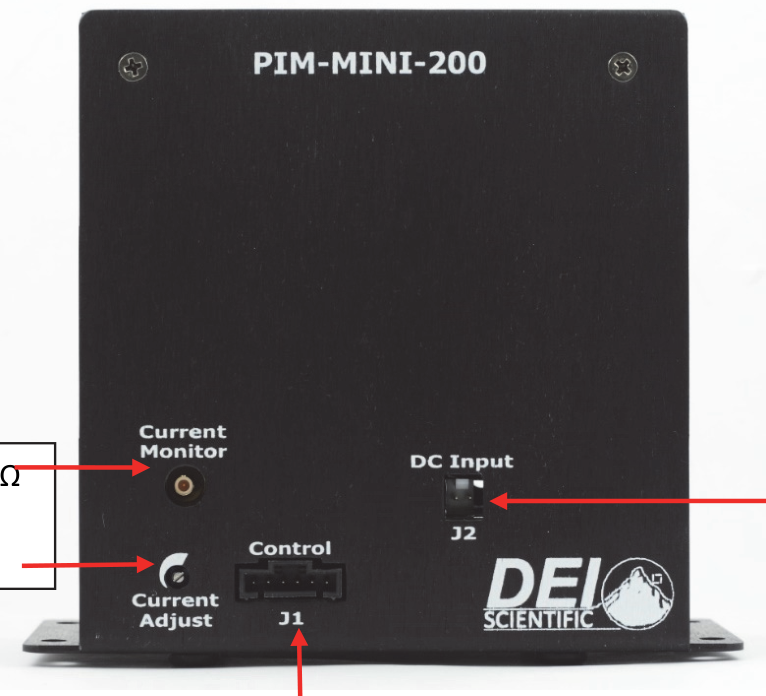
Current Monitor
Monitor output current using an SMB connector with 50 Ω termination.
Internal Current Setpoint Control
Adjust output current to the proper current required. Clockwise increases current output; counter-clockwise decreases current output.
Control Signal Connector J1
Connection for module control.
| Pin | Function |
|---|---|
| 1 | 12 V DC, support voltage |
| 2 | 12 V return |
| 3 | 12 V return |
| 4 | Current setpoint control |
| 5 | Analog current setpoint |
| 6 | Trigger |
DC Input Connector J2
Forward voltage from 0 V to 48 V.
| Pin | Function |
|---|---|
| 1 | DC + |
| 2 | DC − |
2.3 Rear Panel Features
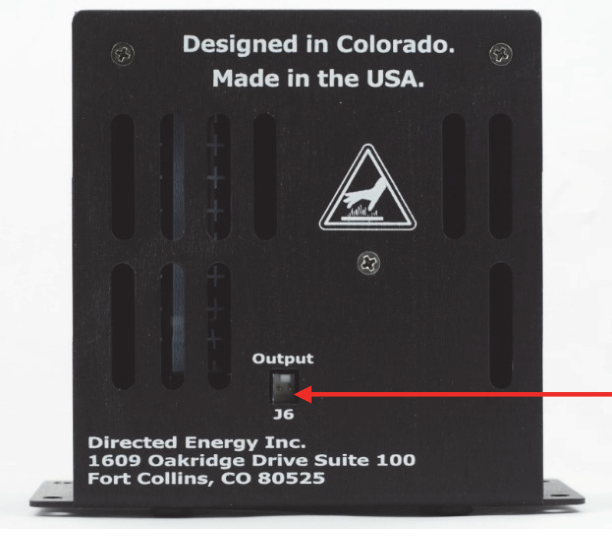
Current Output J6
This socket accepts the factory-supplied output cable, and is the connection for the system-generated current pulses.
2.4 Accessories Included
DC Input Cable
This is a standard two-wire input cable for the compliance voltage connection at J2.
Output Cable
This cable provides output current pulses to an external device at J6.
Control Signal Cable
This cable assembly provides a connection from the control system to the PIM-Mini at the control connector. The control system would include 12 V support voltage, trigger, and analog current control.
3. Operation
3.1 Setup
- All connections must be made prior to powering up the PIM-Mini system.
- Make sure the PIM-Mini has been OFF for at least ten minutes.
- The 12 V support power at Control J1 should be OFF or disconnected.
- The compliance voltage at DC Input J2 should be OFF or disconnected.
- Connect the PIM-Mini Current Output J6 to the diode, or output device, with the correct polarity. If necessary, review the output cable for polarity specifications.
- Connect a DC Input voltage of 12 V above the laser diode's forward voltage to the DC Input J2 power connector.
- Connect the Control Signals to the PIM-Mini at J1. These controls are 12 V DC support power and Trigger.
- Set the system up to use either internal current setpoint control or external current setpoint control.
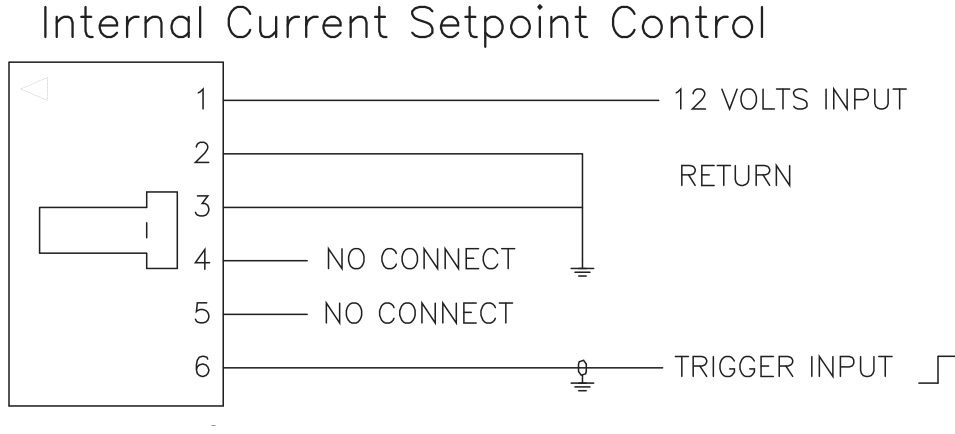
- Internal current setpoint control involves adjusting the internal potentiometer (located on the front panel of the PIM-Mini) for the current output control.
- Disconnect Current Setpoint Control (J1 Pin 4), No Connect.
- Disconnect Analog Current Setpoint (J1 Pin 5), No Connect.
- Rotate the potentiometer clockwise to increase the output current.
- Rotate the potentiometer counter-clockwise to decrease the output current.
- Internal current setpoint control involves adjusting the internal potentiometer (located on the front panel of the PIM-Mini) for the current output control.
Below is an example of the control cable at J1 using internal control.
-
- External current setpoint control uses an external analog voltage to set the output current control.
- Connect Current Setpoint Control (J1 Pin 4) to ground at J1 Pin 2 and 3.
- Connect Analog Current Setpoint (J1 Pin 5) to an external analog device capable of 0 V to 2.048 V.
- External current setpoint control uses an external analog voltage to set the output current control.
Below is an example of the control cable at J1 using external control.
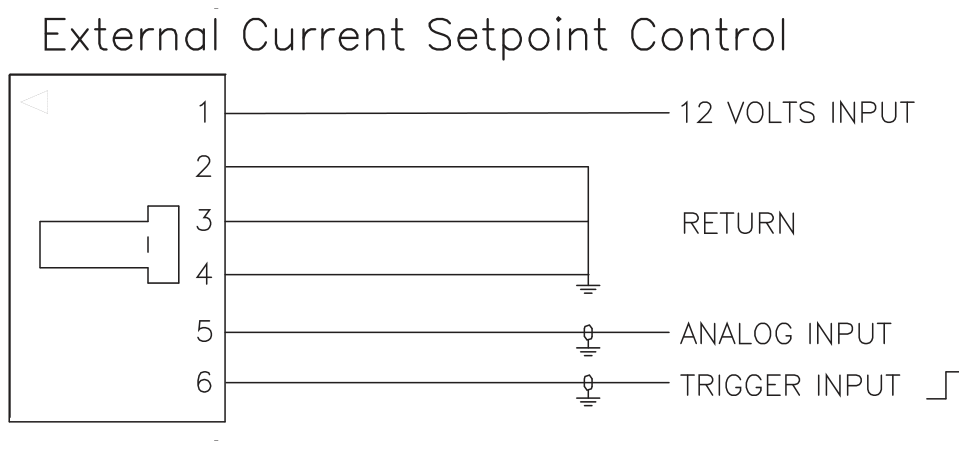
- Connect the Current Monitor device as necessary to the SMB with a 50 Ω termination.
3.2 Power Up
- All connections must be made prior to power up of the PIM-Mini system.
- Power ON the 12 VDC support voltage at Control J1 Pin 1. The module must have a constant 12 VDC power (for at least 100 milliseconds) prior to applying power to the DC Input J2.
- After 100 milliseconds but NOT more than 30 seconds, power ON the DC Input J2 compliance voltage.
- Apply trigger to the module at Control J1 Pin 6. Adjust trigger as necessary, staying within the constraints defined in the PIM-Mini datasheet.
- After 45 seconds from power up, the output signal is available.
- Adjust the Current Output J6 to the output current required for the output device (diode).
- If using the internal current setpoint control, change the Current Adjust potentiometer on the front panel to the output current required.
- If using the external current setpoint control, change the Analog Current device to the output current required.
3.3 Power Down
- Turn OFF the DC Input J2 compliance voltage.
- Stop the trigger source to the module at Control J1 Pin 6.
- If using the analog control, turn OFF the analog control device at Control J1 Pin 5, or set it to 0 V.
- Turn OFF the 12 V DC support voltage at Control J1 Pin 1.
- Wait TEN (10) minutes for the capacitor bank to discharge and for the surface to cool before touching the surface or removing the output device from J6.
4. Warranty and Service
4.1 Warranty
Directed Energy, Inc. (DEI) warrants equipment it manufactures to be free from defects in materials and factory workmanship under conditions of normal use, and agrees to repair or replace any standard product that fails to perform as specified within one year after date of shipment to the original owner. OEM, modified, and custom products are warranted, as stated above, for ninety (90) days from date of shipment to the original owner. This warranty shall not apply to any product that has been:
- Repaired, worked on, or altered by persons unauthorized by DEI in such a manner as to injure, in DEI's sole judgment, the performance, stability, or reliability of the product;
- Subjected to misuse, neglect, or accident; or
- Connected, installed, adjusted, or used otherwise than in accordance with instructions furnished by DEI.
DEI reserves the right to make any changes in the design or construction of its products at any time, without incurring any obligation to make any change whatever in units previously delivered.
DEI's sole obligation, and buyer's sole remedies, under this agreement shall be limited to a refund of the purchase price, or at DEI's sole discretion, to the repair or replacement of products in kind that prove, to DEI's satisfaction, to be defective, when returned to the DEI factory, transportation prepaid by the buyer, within the warranty period. DEI shall in no way be liable for damages consequential or incidental to defects in its products, for failure of delivery in whole or in part, for injuries resulting from its use, or for any other cause.
Returns must be preauthorized and accompanied by a DEI return authorization number.
The foregoing states the entire warranty extended by DEI, and is given and accepted in lieu of (1) any and all other warranties, expressed or implied, including but not limited to the implied warranties of merchantability and fitness for any particular purpose and (2) any obligation, liability, right, claim, or remedy in contract or tort.
4.2 Factory Service and Support
For more information about your instrument or for an operation problem, please contact the factory:
Berkeley Nucleonics Corp.
2955 Kerner Blvd., Suite D
San Rafael, CA 94901
800-234-7858
info@berkeleynucleonics.com
berkeleynucleonics.com