Applications: Radar Simulation, Quantum Computing, High Column Automated Testing, Phase Array Antenna
Products: Model 845
Release Date: July 2019
Purpose
This application note describes how to program signal generators in order to achieve minimal frequency, power and phase setting times.
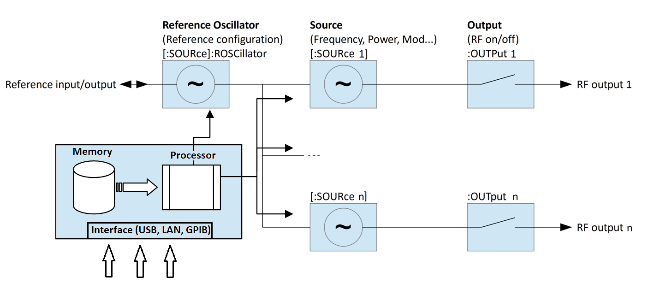
The basic architecture of the generators is introduced as well as the programming syntax.
An example shows how to configure sweeps on multiple channels simultaneously.
Introduction
Generating different frequencies, output powers or modulating the phase of a signal usually implies sending commands from a remote computer over USB, LAN or GPIB to the signal generator. Because of the communication time and the processing of the commands on the generator side, the minimal setting time of a frequency, output power or phase takes several milliseconds.
In order to achieve step times as low as 25 microseconds, BNC devices provide a SWEEP mode, which allows bypassing the whole communication overhead.
Sweep Mode
The sweep mode allows stepping through a series of predefined frequencies, powers and phases either on a single output or simultaneously on several outputs of multi-output signal generators. When programming a sweep, the parameters for each step of the sweep are first simulated on the device. Those parameters are then saved on the internal memory of the device and played once the sweep is started. For this reason, no communication takes place between a remote computer and the device, thus allowing step times as fast as 25 microseconds per output.
The functioning of this mode implies that all frequencies, powers and phases that are being stepped through are known ahead of the start of the sweep. Changing the settings of the sweep requires sending instructions to the device, which adds the communication overhead and interrupts the fast stepping mode.
Quick Command Reference
This quick command reference covers basic sweep functionality: frequency configuration, power configuration and phase configuration. Please refer to application note "How To Program Multi-channel Synthesizers" for examples on how to program individual channels on multi-channel devices; refer to the signal generator programmer's manual for a complete command reference.
:FREQuency:MODE
[SOURce<ch>]:FREQuency:MODE FIX|CW|SWEep|LIST|CHIRp
[SOURce<ch>]:FREQuency:MODE?
This command sets the frequency mode of the signal generator to CW, (list) sweep or chirp.
FIX | CW — Stops a frequency sweep or chirp.
SWEep or LIST — This choice selects the swept frequency mode. If sweep triggering is set to immediate along with continuous sweep mode, executing the command starts the LIST or SWEep frequency sweep. In SWEep mode, frequency will be determined by programmed values for the :STARt and :STOP :FREQuency subsystem commands. In LIST mode, frequency is determined by programmed values for :LIST:FREQuency.
:FREQuency:STARt
[SOURce<ch>]:FREQuency:STARt <value><unit>
[SOURce<ch>]:FREQuency:STARt?
This command sets the first frequency point in a chirp or step sweep.
*RST The preset value is 1 GHz. Please refer to the Data Sheet.
Range Please refer to the Data Sheet.
:FREQuency:STOP
[SOURce<ch>]:FREQuency:STOP <value><unit>
[SOURce<ch>]:FREQuency:STOP?
This command sets the last frequency point in a chirp or step sweep.
*RST The preset value is 2 GHz.
Range Please refer to the Data Sheet.
FREQuency:STEP[:LINear]
[SOURce<ch>]:FREQuency:STEP[:LINear]?This query returns the step size in Hz for a linear step sweep.
FREQuency:STEP:LOGarithmic
[SOURce<ch>]:FREQuency:STEP:LOGarithmic?This query returns the step size (step factor) for a logarithmic step sweep.
POWer:MODE
[SOURce<ch>]:POWer:MODE?This command sets the signal generator power mode to fixed or swept.
FIX — This choice stops a power sweep, allowing the signal generator to operate at a fixed power level. Refer to [:LEVel][:IMMediate][:AMPLitude] command for setting the output power level.
LIST or SWEep — This choice selects the swept power mode. If sweep triggering is set to immediate along with continuous sweep mode, executing the command starts the LIST or STEP power sweep.
POWer:STARt
[SOURce<ch>]:POWer:STARt <value><unit>
[SOURce<ch>]:POWer:STARt?
This command sets the first amplitude point in a step sweep.
POWer:STOP
[SOURce<ch>]:POWer:STOP <value><unit>
[SOURce<ch>]:POWer:STOP?
This command sets the last amplitude point in a step sweep.
POWer:STEP
[SOURce<ch>]:POWer:STEP[:LINear]?This query returns the step size in dB for a linear step sweep.
PHASe:MODE
[SOURce<ch>]:PHASe:MODE?This command sets the signal generator phase mode to fixed or swept.
FIX — This choice stops a phase sweep, allowing the signal generator to operate at a fixed phase setting.
LIST or SWEep — This choice selects the swept phase mode. If sweep triggering is set to immediate along with continuous sweep mode, executing the command starts the LIST or STEP phase sweep.
PHASe:STARt
[SOURce<ch>]:PHASe:STARt <value>
[SOURce<ch>]:PHASe:STARt?
This command sets the first phase point in a step sweep.
PHASe:STOP
[SOURce<ch>]:PHASe:STOP <value>
[SOURce<ch>]:PHASe:STOP?
This command sets the last phase point in a step sweep.
PHASe:STEP
[SOURce<ch>]:PHASe:STEP[:LINear]?This query returns the step size in radians for a step sweep.
:SWEep:COUNt INFinite | <value>
[SOURce<ch>]:SWEep:COUNt Infinite | <value>
[SOURce<ch>]:SWEep:COUNt?
This command sets the number of sweep repetitions being played after triggering a sweep. If set to INFinite, the sweep will be repeated until a [SOURce]:FREQuency:MODE or [SOURce]:POWer:MODE command is issued.
*RST INFinite
Range INFinite or 2-65535
:SWEep:DIRection UP|DOWN|RANDom
[SOURce<ch>]:SWEep:DIRection UP | DOWN | RANDom
Query?
:SWEep:POINts
[SOURce<ch>]:SWEep:POINts <value>
[SOURce<ch>]:SWEep:POINts?
This command defines the number of step sweep points.
*RST 101
Range 2–65535
:SWEep:DWELl
[SOURce<ch>]:SWEep:DWELl <value>
[SOURce<ch>]:SWEep:DWELl?
This command sets the dwell time for the current step sweep points. Dwell time is used when IMMediate is the trigger source. The dwell time is the amount of time the sweep is guaranteed to pause after setting the frequency and/or power for the current point.
The setting enabled by this command is not affected by signal generator power-on, preset, or *RST.
The variable <value> is expressed in units of seconds.
:SWEep:DELay
[SOURce<ch>]:SWEep:DELay <value>
[SOURce<ch>]:SWEep:DELay?
This command sets the off time for the current step sweep points. Off time is used when IMMediate is the trigger source. The off time is the amount of time the sweep is guaranteed to pause after setting the frequency and/or power for the current point.
The setting enabled by this command is not affected by signal generator power-on, preset, or *RST.
The variable <value> is expressed in units of seconds
:SWEep:PROGgress
[SOURce<ch>]:SWEep:PROGgress?This query returns the progress of an active sweep, 0.0…1.0.
:SWEep:SPACing
[SOURce<ch>]:SWEep:SPACing LINear | LOGarithmic
[SOURce<ch>]:SWEep:SPACing?
This command enables the signal generator linear or logarithmic sweep modes. These commands require the signal generator to be in step mode.
The instrument uses the specified start frequency, stop frequency, and number of points for both linear and log sweeps.
*RST LIN
Programming Examples
Programming of the following setup: Sweeping 1000 frequency points on channels 1 and 3 of a multi-output signal generator. The step time is 30us. Run the sweep simultaneously on both channels 1 time.
Channel 1 configuration:
Start frequency: 10 GHz
Stop frequency: 12 GHz
Channel 3 configuration:
Start frequency: 10.1 GHz
Stop frequency: 11.9 GHz
// Configure INIT system: do not listen to
// trigger events yet
INIT:CONT OFF

// Configure trigger system
TRIG:SOUR EXT

// Program sweep on channel 1 - it won't
// start yet as it waits for the INIT system
OUTP1 ON
SOUR1:FREQ:STAR 10GHZ
SOUR1:FREQ:STOP 12GHZ
SOUR1:SWE:DWEL 30US
SOUR1:SWE:DEL 0
SOUR1:SWE:POIN 1000
SOUR1:SWE:COUN 1
SOUR1:FREQ:MODE SWE

// Program sweep on channel 3 - it won't
// start yet as it waits for the INIT system
OUTP3 ON
SOUR3:FREQ:STAR 10.1GHZ
SOUR3:FREQ:STOP 11.9GHZ
SOUR3:SWE:DWEL 30US
SOUR3:SWE:DEL 0
SOUR3:SWE:POIN 1000
SOUR3:SWE:COUN 1
SOUR3:FREQ:MODE SWE

// Configure INIT system: listen to trigger
// events
INIT:CONT ON
Disclaimer
The content of this document is provided by Berkeley Nucleonics 'as is'. Berkeley Nucleonics makes no warranties with respect to the accuracy or completeness of the content of this document and reserves the right to make changes to the specification at any time without notice. All trademarks are the property of their respective owners.