The Model 845 Series (or the Model 855 Series multi-channel) signal generators with option FS allow extremely fast sweeps that, in combination with the trigger system, can generate very accurate and fast frequency and power ramps. In contrast to traditional analog sweeps, fast digital sweeps can be synchronized at any time during the sweep and yield precise frequencies throughout the sweep.
Introduction
The Model 845 Series and Model 855 Series of signal generators can be programmed to execute sweeps by either the BNC graphical user interface (GUI) or by directly using the SCPI commands.
In this application note, we describe the configuration for a frequency sweep with the following parameters:
- Linear sweep from 1 to 12 GHz in total 10 steps
- Execute entire sweep once on every external trigger rising edge
- Frequencies shall be switched every 50 us
- An output trigger shall provide a "signal valid" indication by changing to HIGH whenever the transient is completed and the signal becomes valid
Timing
TRIG OUT remains high until t = 50 us is reached and switching to the next frequency is initiated. Within tau_inv the switching transient is completed and TRIG OUT goes high again. The new frequency / power pair remains stable until t = 150 us is reached. TRIG OUT goes low for a second time and the next frequency / power pair is programmed.
Note that the transient time tau_invN and the valid time tau_valN can vary from point to point, but the step time tau_step (= tau_invN + tau_valN) between frequencies is always 50 us. In particular, for the first frequency of the sweep, tau_inv1 is zero and the tau_val1 is 50 us.
TRIG OUT can be used to precisely synchronize sweeps to any external equipment.
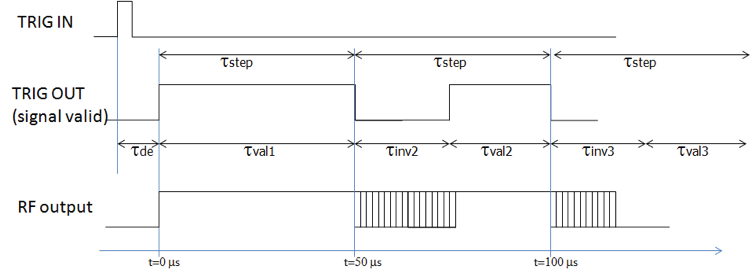
Sweep Configuration
We configure this sweep in three steps:
1. Configure Trigger
Trigger input:
| Command | Value |
|---|---|
| TRIG:SEQ:TYPE | POIN |
| TRIG:SEQ:SOUR | EXT |
| TRIG:SEQ:DEL | 0 |
| TRIG:SEQ:SLOP | POS |
| TRIG:SEQ:ECO | 1 |
Trigger output:
| Command | Value |
|---|---|
| TRIG:OUTP:MODE | VAL |
2. Configure Sweep
| Command | Value |
|---|---|
| SOUR:SWE:COUN | 1 |
| SOUR:SWE:DWEL | 50e-6 |
| SOUR:SWE:DEL | 0 |
| SOUR:SWE:SPAC | LIN |
| SOUR:SWE:POIN | 10 |
| SOUR:SWE:STAR | 1e9 |
| SOUR:SWE:STOP | 12e9 |
| SOUR:FREQ:MODE | SWE |
3. Arm Trigger
| Command | Value |
|---|---|
| INIT:CONT | ON |
Key Specifications
- -90 to +13 dBm power output (PE model)
- -90 to +23 dBm power output (HP model)
- Down to 10 us frequency switching time
- Very low SSB phase noise
- Powerful trigger and sweeping modes
- Available on all 845 platforms (bench, rack, module; 12, 20, 26 GHz)
Graphical User Interface (GUI) Setup
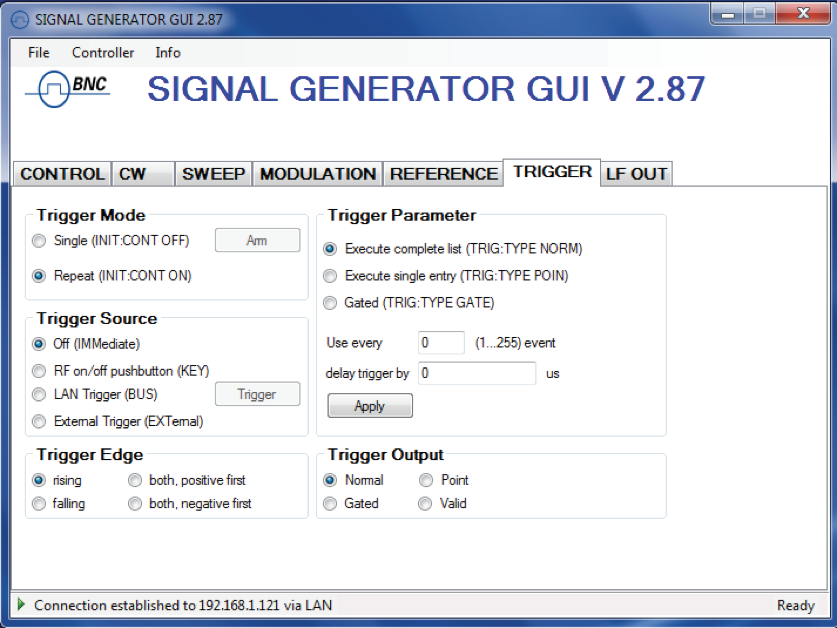
In the GUI, the setup is straightforward. First, we configure the trigger system to wait for rising edge and run the entire sweep upon trigger.
We switch to the TRIGGER tab of the GUI as shown in Figure 2. We set trigger mode to "Repeat", Trigger source to "External Trigger", Trigger Edge to "Rising", and Trigger Parameter to "Execute complete List". In the trigger output setting we set "Valid".
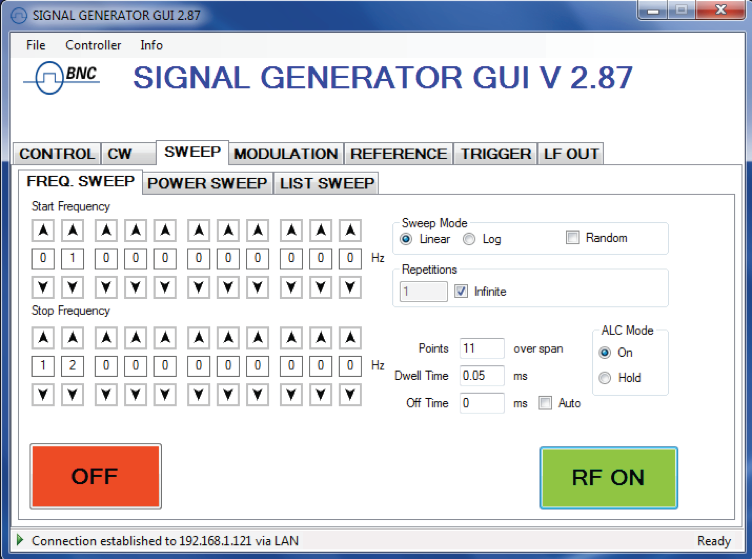
Next, we switch to the SWEEP tab of the GUI as shown in Figure 3.
We set the start frequency to 1 GHz, and stop frequency to 12 GHz. The number of repetitions of the sweep we set to 1, number of points to 10, "Dwell time" to 0.05 ms, disable the "Auto" and set the "Off time" to 0 ms.
We can choose for the ALC (automatic level control) to operate in "on" or "hold" mode. We can start the sweep with the "on/off" button on the left.
Applications
- ATE
- R&D low noise signal source
- Production testing (industry-leading switching times; high dynamic range)
- Service and maintenance (battery operation)
- Signal simulation (radar, WiMAX, UWB)
- Aerospace and defense (pulse modulator, chirps)
Measurement Results
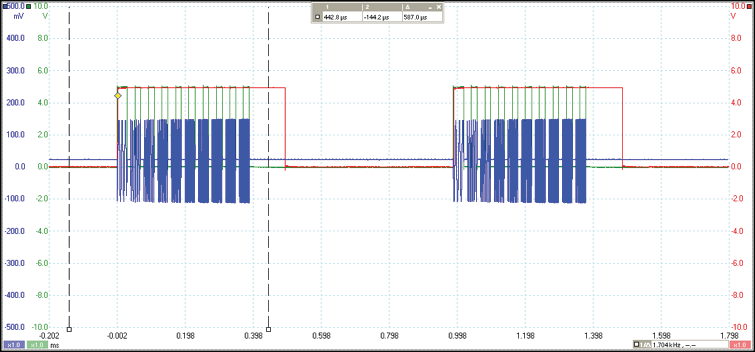
Figure 4 shows the time domain measurements of the sweep. TRIG IN is applied approximately every 990 microseconds from an external source (red trace). Upon the rising edge, the "signal valid" (green trace) goes high almost instantly, indicating that the first frequency RF (blue trace) is stable. After the ten consecutive frequencies, "signal valid" goes low a last time and remains low until a new sweep starts upon a new trigger rising edge.
Conclusion
The option FS for the Model 845 Series allows extremely fast and precise digital sweeps that can be well synchronized to external equipment using input and output trigger.
Industry Comparison
RF / microwave signal generators. 3 GHz, 6 GHz, 12 GHz, 20 GHz and 26.5 GHz available.
| Equipment | Model 84520 | Keysight MXG N5183A | Keysight E8257D PSG w/ options | R&S SMB B120L w/ options |
|---|---|---|---|---|
| Freq. range | 100 kHz to 20.5 GHz | 250 kHz to 20 GHz | 250 kHz to 20 GHz | 100 kHz to 20 GHz |
| Resolution | 0.001 Hz | 0.01 Hz | 0.01 Hz | 0.001 Hz |
| Switching speed | 0.2 ms; 0.03 ms option FS | 5 ms; 1.15 ms option UNZ | 9 ms | 3 ms |
| Power range | -30 to +20 dBm; -90 to +13 dBm option PE3; -20 to +26 dBm option HP | -90 to +7 dBm | -135 to +15 dBm | -20 to +22 dBm |
| Resolution | 0.01 dB | 0.01 dB | 0.01 dB | 0.01 dB |
| Phase noise 10G | -108 dBc/Hz; -117 dBc/Hz OCXO option LN | -98 dBc/Hz | -115 dBc/Hz | -108 dBc/Hz |
| OCXO | < 0.1 ppm; 0.01 ppm option LN | < 1 ppm | < 0.05 ppm | < 0.1 ppm |
| Modulations | AM/FM/PM/pulse trains/chirps | Optional | Optional | Optional |
| Extras | Portable, internal battery | |||
| Weight, size | 2.5 kg | 12.8 kg | 22 kg | 6.9 kg |
| Power consump. | < 15 W | 250 W | 250 W | > 90 W |
| List price | $17,000.00 USD | $42,000.00 USD | $68,000.00 USD | $51,000.00 USD |
All benchtop model features:
- LAN/USB/GPIB remote control with SCPI 1999 command set
- Complimentary, powerful and easy to use GUI
- Compact, robust, lightweight, portable and rugged design
- Sealed, fan-less enclosure (low power consumption)
- Internal rechargeable battery options
- Field carrying case available
- Single and double rackmounts available